Open Spotify Links in YouTube Music (Android & iPhone)
Open shared Spotify songs, albums and artists straight in YouTube Music – automatically on Android, via the share menu on iPhone.
Read guide →Click a shared Spotify or Apple Music link in WhatsApp or Telegram, and SongFlip opens it immediately in your favorite player. No login walls, no app store detours, no manual searching.

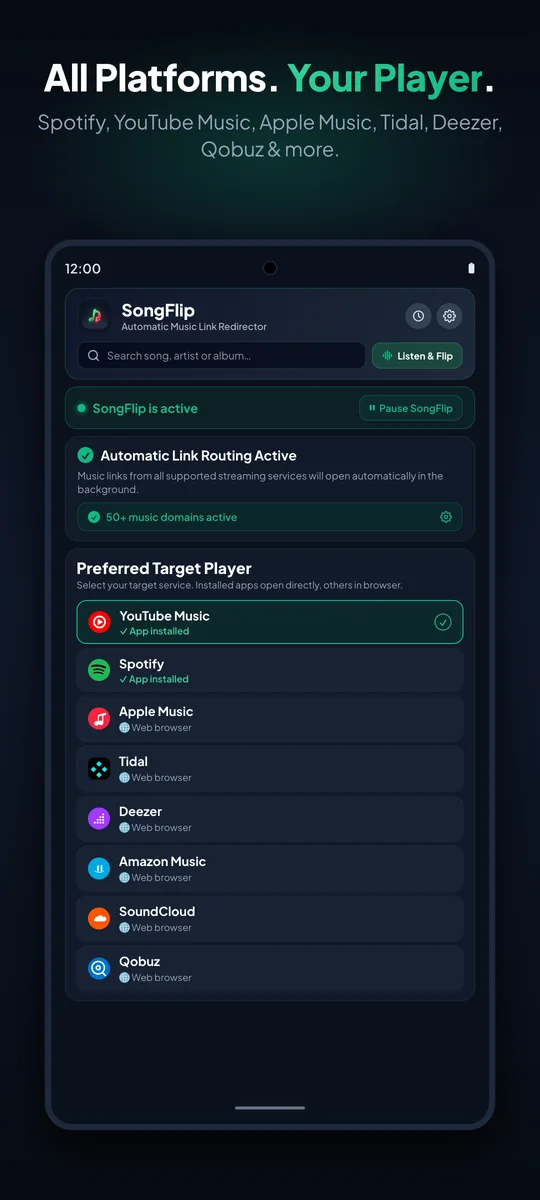
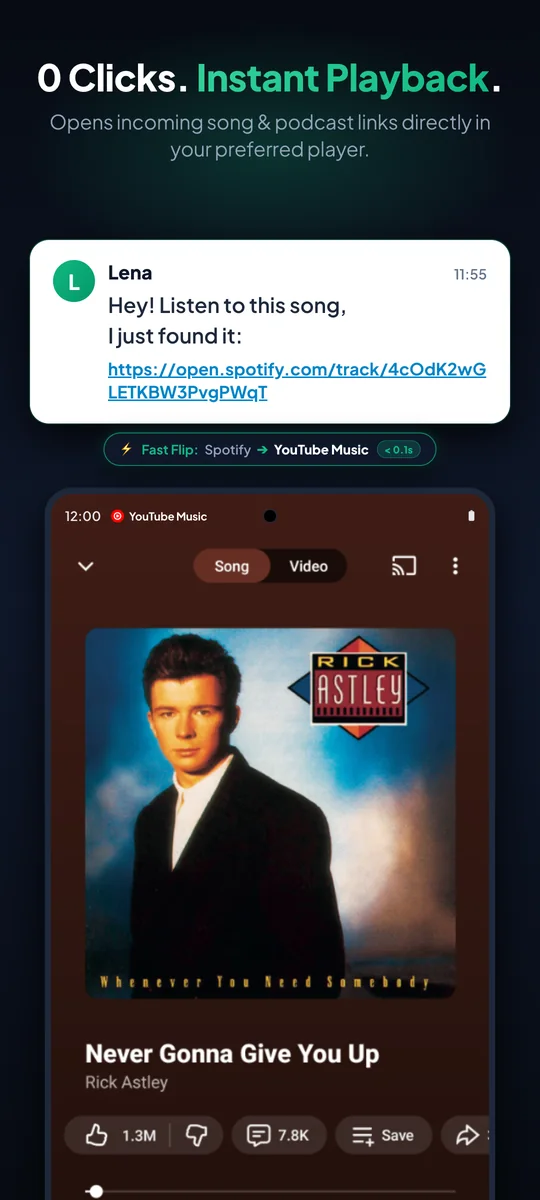
Install once, choose your preferred player, and never worry about wrong music links again.
Download SongFlip and enable redirection — via system settings on Android or the Share Sheet on iOS.
Select where you prefer to listen to music — such as YouTube Music, Spotify, Tidal, or Apple Music.
Done! Tap any music link in WhatsApp, Telegram, Instagram, or emails — it plays instantly.
Paste any music link below to open it in your favorite player or create a free universal link to share with friends.
No matter what platform your friends use and what player you love: SongFlip seamlessly bridges the gap.
No gimmicks, no ads, no tracking. Just music that plays on tap.
Tap a shared music link and the song starts right in your favorite player — with 0 clicks on Android and 1 click via the Share Sheet on iOS.
Official & FOSS Players (RiMusic, ReVanced)Opens known songs without delay, saves links in dead zones, and with PRO automatically prefers original albums and studio quality (Hi-Res) on Tidal, Qobuz, Apple Music & Deezer over radio edits.
Studio Masters & Offline ReadyWhat song is playing right now? Identify music around you with subtle haptic confirmation directly in the app or via a quick-launch button — even with no signal in clubs, without disruptive auto-play.
Quick Launch & Offline Club ModeRedirects single tracks, albums, artists, podcasts, and entire playlists (up to 200 songs) — including direct import from .m3u8, .csv, and text files, 1-tap refresh in history, file export, and direct search.
Full Matching & Playlist TransferNo registration, no user account, no cookies, and zero tracking of your listening habits. Fully open source (GPLv3) and running right on your phone.
GPLv3 • Privacy FirstSongFlip automatically adapts to your phone's language — supporting 34+ languages in the app and 22 languages on the website.
Auto-DetectedDedicated classical movement matching, conductor and composer metadata, and lossless studio resolution for discerning audiophiles.
Hi-Res & Classical PrecisionUnrestricted cross-platform sharing for rising creators, trending afrobeats, exclusive mixtapes, DJ sets, and underground cuts.
Creators & Mixtapes
Tired of asking friends which music streaming service they use? SongFlip generates lightning-fast, universal smart links for songs (/s/...) and full playlists (/p/...) with rich album art and 1-tap playback buttons for every major player.

“Sharing music with friends should be effortless. SongFlip removes platform friction so everyone can enjoy songs in their favorite player without extra clicks.”
I built SongFlip out of personal daily frustration: friends would send me Apple Music or Spotify links, but I listen on YouTube Music and Tidal. Instead of seamless listening, I was greeted by login walls, app store detours, and broken momentum. Tech giants build walled gardens to lock users in. As an independent developer from Germany, I created SongFlip as an open-source, privacy-first bridge — no accounts, no tracking, and zero battery drain.
All core redirection features are and will remain 100% free and ad-free. For power users, SongFlip PRO unlocks maximum freedom.
songflip.link/s/... links with 30s audio preview & QR code to share with friendsNo web account or login required.
Maximum privacy and uncompromising security. Running 100% locally on your device.
No background daemon, zero battery drain. SongFlip stays completely dormant and only wakes up for a split second when a music link is tapped, requiring zero sensitive permissions.
Silent & InvisibleFully auditable GPLv3 open source code on GitHub. Built by independent developer Daniel Notthoff under strict European GDPR privacy regulations.
GPLv3 • GDPR CompliantEverything you need to know about SongFlip, compatibility, privacy, and how it works.
Yes! If you tap a link in a dead zone or identify a song in a basement club, SongFlip saves the request and opens the track automatically as soon as your connection returns.
No! You never have to connect your Spotify, Google, or Apple account. Just install the app, pick your favorite player, and start listening — with zero accounts and zero background battery drain.
Yes, 100%. Automatically redirecting songs, albums, podcasts, and artists, in-app song search, and 3 song recognitions per month are permanently free and ad-free. Optionally, SongFlip PRO (from $0.99/month or $19.99 once) unlocks the Playlist Converter (up to 200 songs), unlimited Listen & Flip, studio-quality matching, and Smart Share Links.
No! Shared SongFlip links (songflip.link/s/...) open in any web browser. Your friends get a 30-second audio preview and can play the song with 1 tap in their own music app — no app install needed.
Simply tap Share ➔ SongFlip in your music app (or share any song from your SongFlip history). Your universal link is copied straight to your clipboard, ready to paste into any chat.
Yes, reliably. SongFlip supports all languages, special characters, and scripts (accents, umlauts, Japanese, Cyrillic, etc.) and finds the matching track in every service.
It lets you identify music playing around you via microphone — right inside the app or via a quick-launch button over any other app. The recognized song is saved straight to your history for your favorite player (without disruptive auto-play). 3 songs per month are free, or unlimited with PRO — even completely offline in a club.
No, as long as they are clicked. Every visit automatically extends the link for another 90 days, keeping shared songs in your chats permanently active.
Yes, across your entire phone. Whether it's WhatsApp, Telegram, Signal, Instagram, TikTok, or your browser — one tap on the link is all it takes.
Yes, with a single tap in the app or via the Quick Settings tile (Android), you can pause SongFlip for 15 minutes, 1 hour, or until tomorrow morning.
Yes! You can convert public playlists (up to 200 tracks) between Spotify, YouTube Music, Apple Music, Tidal, and Deezer, import local tracklists directly from .m3u8, .csv, and text files, play them directly, or export them as a file (5 tracks free, up to 200 with PRO). Private playlists or personal mixes (like Discover Weekly) are not loaded for privacy reasons since SongFlip works without account logins.
Yes! On iPhone, you redirect music links with 1 tap via the Share Sheet (Share ➔ SongFlip), the Action Button, or Siri directly into your favorite player.
SongFlip resolves multi-artist collaborations, featured artists, and edition tags with high precision, automatically prioritizing the original studio album cut over radio edits or covers (with PRO, in lossless studio/Hi-Res quality). If a target music app isn’t installed on your device, SongFlip seamlessly opens the song in the browser without navigation loops. You can also use 'Wrong song?' in your history to switch between Original, Live, or Remix anytime.
Android greys out music apps that are already installed on your phone because they already open their own links. That's completely normal: in SongFlip, simply check the other services you want to redirect into your player.
Never. SongFlip works without accounts, ad trackers, or cookies. Your song history stays strictly on your phone.
Yes. The source code is publicly available on GitHub under the free GPLv3 license — transparent, independent, and guaranteed free of hidden tracking.
Yes! Podcast episodes and shows are redirected just as easily between Spotify, Apple Podcasts, YouTube Music, Pocket Casts, Deezer, and Amazon Music.
Step-by-step instructions for Android, iOS, and seamless music streaming.
Open shared Spotify songs, albums and artists straight in YouTube Music – automatically on Android, via the share menu on iPhone.
Read guide →Links land in Chrome, domains are greyed out, settings look different on Samsung: how Android's link handling works and how to fix it.
Read guide →Landing page, direct app opening or library migration? A fair look at Songlink/Odesli, SongFlip, Soundiiz and TuneMyMusic.
Read guide →One songflip.link page per song: recipients hear a 30-second preview and open the track in their own service with one tap – no app needed.
Read guide →Open shared music links automatically in your favorite player. Available now for iOS (TestFlight) and Android (Google Play).
Scan this QR code with your smartphone camera to instantly open and download SongFlip on your mobile device.